
Rapid PVST+ and LACP Sim
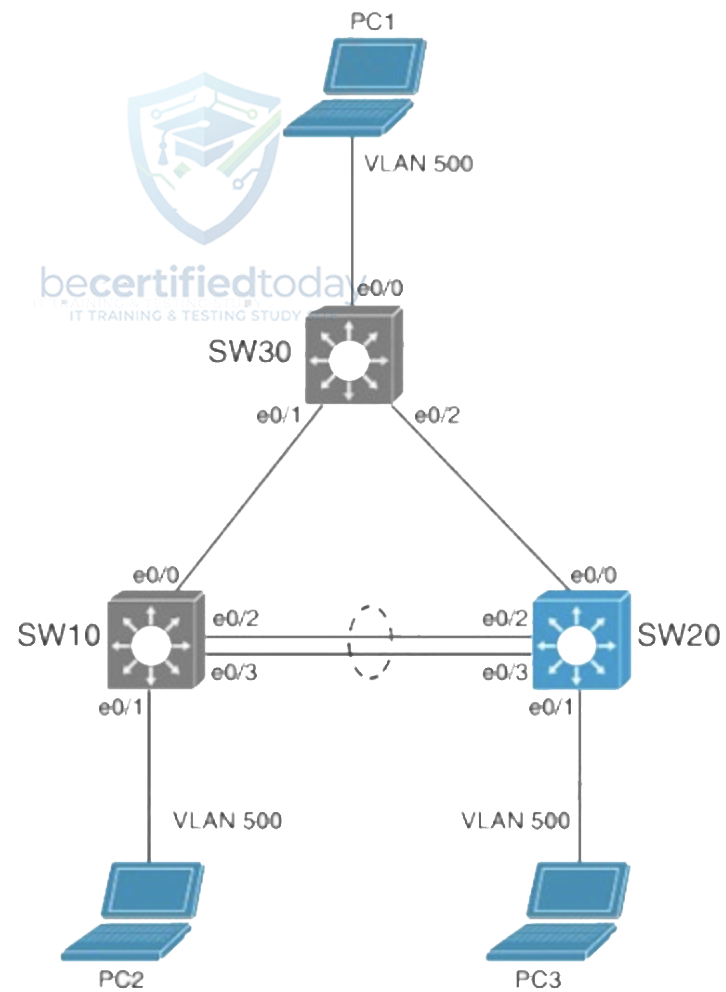
Device in prompt:
Tasks
This BeCertifiedToday lab mirrors the kind of cleanup you run into on real tickets. Work through SW20 and get the site back to a healthy state:
- Configure Rapid PVST+ on SW20.
- The trunk between SW20 and SW30 is not operational. Troubleshoot the issue and ensure PC3 can ping PC1 (10.10.100.10) across the link.
- The LACP port channel between SW10 and SW20 is not operational. Troubleshoot the issue and ensure PC3 can ping PC2 (10.10.100.20) across the port channel.
Note: No access is provided to SW10 or SW30. Resolve these issues by making changes only to SW20. Traffic on all trunks should be restricted to only active VLANs.
Pick a device under Device in prompt, then open that device console to run commands.